What it is
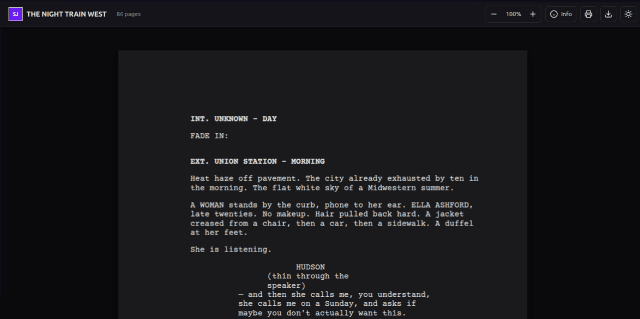
screenjson-ui is an embeddable document viewer for ScreenJSON files. It
renders a ScreenJSON document as a pixel-accurate, Warner Bros / Final Draft-
style screenplay in the browser: Courier Prime at 12pt, correct margins for
action, dialogue, cues, parentheticals, and transitions, scene numbers in
the margin if you want them, page numbers top-right, dark and light themes.
It is framework-agnostic. Install it from npm, import it into a React or Vue app, or use the native Svelte component in a Svelte/SvelteKit codebase.
Features
- PDF-style rendering. Warner Bros / Final Draft margins, Courier Prime 12pt, 60 lines per page.
- Dark & light themes with persistence.
- Multi-language — a ScreenJSON file can carry translations of every text run; switch on the fly.
- Virtual scrolling for 300+ page documents without jank.
- Responsive — works from 400px phones to 1200px+ desktops.
- Encrypted content — supply a password and encrypted runs decrypt in-browser.
- Bookmarks & notes — stored in
localStorageper document. - Metadata panel — character list, scene index, SFX/VFX/props/wardrobe breakdowns.
- Package-first — published as
@screenjson/uifor standard npm workflows.
Install
NPM
npm install @screenjson/uiUse
JavaScript API
import ScreenJSONUI from '@screenjson/ui';

const viewer = new ScreenJSONUI({
  element: 'viewer',          // element id or HTMLElement
  src: '/screenplay.json',    // URL — or pass `document` for inline JSON
  theme: 'dark',
  numbered: true,
  virtual: true,
  onLoad:       (doc)  => console.log('loaded', doc.title),
  onPageChange: (page) => console.log('page', page),
});
Browser ESM
<link rel="stylesheet" href="https://unpkg.com/@screenjson/ui/dist/ui.css" />
<script type="module">
  import ScreenJSONUI from 'https://unpkg.com/@screenjson/ui/dist/screenjson-ui.js';
  new ScreenJSONUI({ element: 'viewer', src: '/screenplay.json', theme: 'dark' });
</script>
Svelte
<script lang="ts">
  import { ScreenJSONViewer } from '@screenjson/ui';
  import type { ScreenJSONDocument } from '@screenjson/ui';

  export let document: ScreenJSONDocument;
</script>

<ScreenJSONViewer {document} theme="light" numbered />
Configuration
| Option | Type | Default | Description |
|---|---|---|---|
element | string | HTMLElement | required | Target container |
src | string | — | URL to load ScreenJSON from |
document | ScreenJSONDocument | — | Pre-loaded document object |
theme | 'light' | 'dark' | 'light' | Initial theme |
zoom | number | 1 | 0.5 – 2 |
lang | string | document default | BCP 47 tag for rendered text |
page | number | 1 | Initial page |
numbered | boolean | false | Show scene numbers in margins |
paginated | boolean | true | Show page numbers |
corner | string | 'top-right' | Menu button position |
virtual | boolean | false | Virtualised scrolling |
password | string | — | Decrypt password for encrypted content |
onLoad | function | — | Called when the document loads |
onPageChange | function | — | Called on page change |
onError | function | — | Called on error |
Formatting standards
The viewer targets the Warner Bros / Final Draft convention used by every major studio:
- Paper: US Letter (8.5” × 11”)
- Font: Courier Prime, 12pt
- Lines/page: 60 maximum
- Margins: Action 1.7”L / 1.1”R · Dialogue 2.7”L / 2.4”R · Character 4.1”L · Parenthetical 3.4”L / 3.1”R · Transition 6.0”L
If you need A4 or a different font stack, both are configurable at render time.
Browser support
Chrome 90+ · Firefox 90+ · Safari 14+ · Edge 90+.
When to use it
Use screenjson-ui when you want to show a screenplay inside your own
product: a writers’ room UI, a producer dashboard, a studio archive, an
e-reader, a review tool, a marketing site. It’s the fastest path from “I
have a ScreenJSON file on an object store” to “our users can read it”.
Pair with screenjson-cli or
Greenlight to produce the JSON in the first place.
It’s also the renderer inside screenjson-server’s web app, where a script re-renders live as people and agents edit it.
License
MIT. The schema it renders is also open: see the specification.